
This email is from an external sender, meaning it is not from an account within our email system. If this e-mail seems suspicious, especially if tone is urgent, secretive, and/or inflammatory, please exercise extra caution:
- DO NOT click links or open attachments as doing so could lead to credential harvesting, ransomware, or other cybersecurity event.
- DO NOT assume this e-mail is legitimate even if it appears to be from somebody you know.
- If you know the supposed sender, contact them by voice or video via Microsoft Teams or other trusted way to verify the request, any link, or attachment.
- Avoid using contact information provided in the e-mail as it may be counterfeit, use contact information you already know or from a published directory.
- Do not SMS/Text or reply to the e-mail as you may be communicating with the scam perpetrator.
- Be aware that many scams involve requests for “quick favors” that lead to requests for money or gift cards.
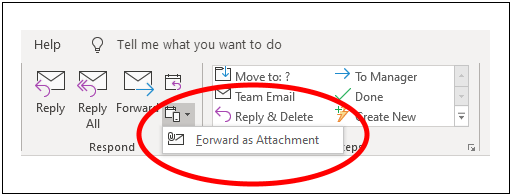
If you have any doubt about this e-mail – or would like a second opinion – the NPUC IT department is also happy to review the e-mail. Please forward suspicious e-mails to help@nw.npuc.org. If you’re able to use Outlook on a computer, please use the Forward as Attachment option because this preserves the entire e-mail. The normal forwarding method, while still useful, does not preserve all available information.
This illustration highlights the location of the Forward as Attachment feature in Outlook on Windows:
Alternatively, if you have trouble finding the Forward as Attachment option, you can also accomplish the same outcome by “dragging and dropping” suspicious e-mails into the body of a new e-mail. It’s the same process as when dragging files from your computer into an e-mail for attaching purposes.
Thank-you for being vigilant. You are one of our very best defenses against those who intend to harm us.